Difference between revisions of "Red Dot"
(Swapped main picture with inventory render.) |
|||
| (17 intermediate revisions by 2 users not shown) | |||
| Line 1: | Line 1: | ||
| + | [[File:2025-06-26_Red_Dot_inventory.png|257px|frame|right|<div style="font-size:120%; text-align:center">[[Manta]] • [[Hammerhead]] • [[Red Dot]]</div>]] | ||
| + | <blockquote> | ||
| + | ''A small optic with an illuminated sight which will accurately show aim point regardless of sway. Batteries included.'' | ||
| + | </blockquote> | ||
| + | == Details == | ||
| + | === Overview === | ||
The [[Red Dot]] is a weapon attachment in [[Intruder]]. It may be placed on the [[Manta]], as well as the [[Hammerhead]]. | The [[Red Dot]] is a weapon attachment in [[Intruder]]. It may be placed on the [[Manta]], as well as the [[Hammerhead]]. | ||
| − | |||
The [[Red Dot]] sight is a reflex sight, which allows the player to more easily engage targets. It enables a zoom-in function while aiming down sights. To activate this feature, players can either hold down the '''RIGHT-CLICK''' ([[Controls#Keyboard|<code>Fire2</code>]]) button if the Toggle Aim-down-sights option is enabled, or hold down the '''LEFT-SHIFT''' ([[Controls#Keyboard|<code>Sprint</code>]]) key if the Toggle Aim-down-sights option is disabled. Upon acquiring a [[Red Dot]] sight, it automatically attaches to the first weapon (in inventory order) lacking an attachment, provided the Auto-Attach option is enabled in the general options menu. If this option is disabled, players can manually equip the [[Red Dot]] sight by clicking and dragging it onto the corresponding slot of a compatible weapon in the inventory menu. | The [[Red Dot]] sight is a reflex sight, which allows the player to more easily engage targets. It enables a zoom-in function while aiming down sights. To activate this feature, players can either hold down the '''RIGHT-CLICK''' ([[Controls#Keyboard|<code>Fire2</code>]]) button if the Toggle Aim-down-sights option is enabled, or hold down the '''LEFT-SHIFT''' ([[Controls#Keyboard|<code>Sprint</code>]]) key if the Toggle Aim-down-sights option is disabled. Upon acquiring a [[Red Dot]] sight, it automatically attaches to the first weapon (in inventory order) lacking an attachment, provided the Auto-Attach option is enabled in the general options menu. If this option is disabled, players can manually equip the [[Red Dot]] sight by clicking and dragging it onto the corresponding slot of a compatible weapon in the inventory menu. | ||
| + | === Stats === | ||
| + | {| | ||
| + | |style="padding:1px 1em; background-color:#C8C8FF;"| '''To-do:''' Get stats on FOV increase: Without Red Dot, with Red Dot, focused with Red Dot. | ||
| + | |} | ||
| + | === Keybinds === | ||
| + | {| | ||
| + | |style="padding:1px 1em; background-color:#C8C8FF;"| '''To-do:''' Add both control options for focusing while ADS. | ||
| + | |} | ||
== Unlockables == | == Unlockables == | ||
| − | + | {| | |
| + | |style="padding:1px 1em; background-color:#C8C8FF;"| '''To-do:''' Move Red Dot unlockables to separate page. | ||
| + | |} | ||
| − | === Common === | + | <div class="mw-collapsible mw-collapsed"> |
| − | <gallery> | + | The [[Red Dot]] sight offers various reticle variations: |
| − | File: | + | <div class="mw-collapsible-content"> |
| − | File: | + | === <FONT COLOR="Blue">Common</FONT> === |
| − | File: | + | <gallery mode="packed"> |
| + | File:UDotSteam.png|U Dot | ||
| + | File:EyeDotSteam.png|Eye Dot | ||
| + | File:HDotSteam.png|H Dot | ||
</gallery> | </gallery> | ||
| + | ---- | ||
| − | === Uncommon === | + | === <FONT COLOR="Green">Uncommon</FONT> === |
| − | <gallery> | + | <gallery mode="packed"> |
| − | File: | + | File:VDotSteam.png|V Dot |
| − | File: | + | File:Triple V.png|Triple V |
| − | File: | + | File:Triple T.png|Triple T |
| − | File: | + | File:XDotSteam.png|X Dot |
| − | File:BubbleDotSteam.png| | + | File:BubbleDotSteam.png|Bubble |
| − | File: | + | File:PointDotSteam.png|Point Dot |
| − | File: | + | File:LineDotSteam.png|Line Dot |
</gallery> | </gallery> | ||
| + | ---- | ||
| − | === Rare === | + | === <FONT COLOR="Orange">Rare</FONT> === |
| − | <gallery> | + | <gallery mode="packed"> |
| − | File:SquareDotSteam.png| | + | File:SquareDotSteam.png|Square Dot |
| − | File:EyeTwoDotSteam.png| | + | File:EyeTwoDotSteam.png|Eye Two Dot |
| − | File:ThreeDotSteam.png| | + | File:ThreeDotSteam.png|Three Dot |
| − | File:Cross Dot.png| | + | File:Cross Dot.png|Cross Dot |
| − | File:FourDotSteam.png| | + | File:FourDotSteam.png|Four Dot |
| − | File:NineDotSteam.png| | + | File:NineDotSteam.png|Nine Dot |
| − | File:ThirteenDotSteam.png| | + | File:ThirteenDotSteam.png|Thirteen Dot |
</gallery> | </gallery> | ||
| − | + | ---- | |
| − | === Very Rare === | + | === <FONT COLOR="Purple">Very Rare</FONT> === |
| − | <gallery> | + | <gallery mode="packed"> |
| − | File:LeaderDotSteam.png| | + | File:LeaderDotSteam.png|Leader Dot |
| − | File:TenDotSteam.png| | + | File:TenDotSteam.png|Ten Dot |
| − | File:WingDotSteam.png| | + | File:WingDotSteam.png|Wing Dot |
| − | File:DoubleLineDotSteam.png| | + | File:DoubleLineDotSteam.png|Double Line Dot |
| − | File:DiamondHolo.png| | + | File:DiamondHolo.png|Diamond Holo |
| − | File:Package Dot.png| | + | File:Package Dot.png|Package Dot |
</gallery> | </gallery> | ||
| − | + | ---- | |
| − | === Ultra Rare === | + | === <FONT COLOR="Red">Ultra Rare</FONT> === |
| − | <gallery> | + | <gallery mode="packed"> |
| − | File:NDotSteam.png| | + | File:NDotSteam.png|N Dot |
| − | File:FullCrossSteam.png| | + | File:FullCrossSteam.png|Full Cross |
</gallery> | </gallery> | ||
| − | + | ---- | |
| − | |||
| − | |||
| − | |||
| − | |||
| − | |||
| − | |||
| − | |||
| − | |||
| − | |||
=== Unique === | === Unique === | ||
| − | <gallery> | + | <gallery mode="packed"> |
File:ClassicDotSteam.png|Classic Dot | File:ClassicDotSteam.png|Classic Dot | ||
File:BracketDotSteam.png|Bracket | File:BracketDotSteam.png|Bracket | ||
| Line 84: | Line 95: | ||
File:Perspective Dot.png|Perspective Dot | File:Perspective Dot.png|Perspective Dot | ||
</gallery> | </gallery> | ||
| + | ---- | ||
| + | === Seasonal === | ||
| + | <gallery mode="packed"> | ||
| + | File:Bat V.png|Bat V | ||
| + | File:Ghost Dot.png|Ghost Dot | ||
| + | File:Jack O Dot.png|Jack O Dot | ||
| + | File:Spider Dot.png|Spider Dot | ||
| + | File:Webbed Dot.png|Webbed Dot | ||
| + | </gallery> | ||
| + | </div> | ||
| + | </div> | ||
| + | |||
| + | == [[Tuning]] == | ||
| + | {| | ||
| + | |style="padding:1px 1em; background-color:#C8C8FF;"| '''To-do:''' Cut? All tuning affects weapon red dot is attached to. | ||
| + | |} | ||
| + | |||
| + | == Trivia == | ||
| + | {| | ||
| + | |style="padding:1px 1em; background-color:#C8C8FF;"| '''To-do:''' Mention old model replace date. Mention old default red dot texture date. | ||
| + | |} | ||
| + | |||
| + | == Gallery == | ||
| + | {| | ||
| + | |style="padding:1px 1em; background-color:#C8C8FF;"| '''To-do:''' Clean up. | ||
| + | |} | ||
| + | |||
| + | [[File:Reddotingame2.jpg|500px|right]] | ||
| − | + | Old Model | |
| − | + | <gallery mode="slideshow"> | |
| − | + | File:smgred.png|[[Red Dot]] sight attached to [[Manta]] | |
| + | File:Reddotfocus.png|ADS with [[Red Dot]] on [[Manta]] | ||
| + | </gallery> | ||
== History == | == History == | ||
| + | {| | ||
| + | |style="padding:1px 1em; background-color:#C8C8FF;"| '''To-do:''' Clean up. Make identical to other item pages (EX: Manta). | ||
| + | |} | ||
*[[Change Log]] | *[[Change Log]] | ||
| − | **[[Build 73]] - New | + | U5 Builds |
| − | **[[Patch 449]] - | + | **[[Build 73]] - New red dot sight that actually works as it should, super useful, especially at low energy (Thank you Action Man!) |
| − | **[[Patch 441]] - Fixed | + | U4 Patches |
| − | + | **[[Patch 449]] - Red Dot made more menacing | |
| − | **[[Patch 440]] - | + | **[[Patch 441]] - Fixed Red Dot lighting; Fixed Red Dot super hat, sorry ;*( |
| − | + | **[[Patch 440]] - Red dot sight for the SMG, pick up and re-equip SMG, hold right click to zoom down sight; Red dot pick ups added to both levels. | |
| − | |||
| − | + | == See also == | |
{{List of Weapons and Gadgets}} | {{List of Weapons and Gadgets}} | ||
| − | + | [[Category:Intruder]] | |
| − | [[Category: | + | [[Category:Items]] |
| − | [[Category: | + | [[Category:To-do]] |
Latest revision as of 12:16, 29 June 2025

A small optic with an illuminated sight which will accurately show aim point regardless of sway. Batteries included.
Details
Overview
The Red Dot is a weapon attachment in Intruder. It may be placed on the Manta, as well as the Hammerhead.
The Red Dot sight is a reflex sight, which allows the player to more easily engage targets. It enables a zoom-in function while aiming down sights. To activate this feature, players can either hold down the RIGHT-CLICK (Fire2) button if the Toggle Aim-down-sights option is enabled, or hold down the LEFT-SHIFT (Sprint) key if the Toggle Aim-down-sights option is disabled. Upon acquiring a Red Dot sight, it automatically attaches to the first weapon (in inventory order) lacking an attachment, provided the Auto-Attach option is enabled in the general options menu. If this option is disabled, players can manually equip the Red Dot sight by clicking and dragging it onto the corresponding slot of a compatible weapon in the inventory menu.
Stats
| To-do: Get stats on FOV increase: Without Red Dot, with Red Dot, focused with Red Dot. |
Keybinds
| To-do: Add both control options for focusing while ADS. |
Unlockables
| To-do: Move Red Dot unlockables to separate page. |
The Red Dot sight offers various reticle variations:
Common

U Dot

Eye Dot

H Dot


Uncommon

V Dot

Triple V

Triple T

X Dot

Bubble

Point Dot

Line Dot


Rare

Square Dot

Eye Two Dot
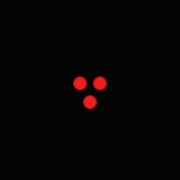
Three Dot

Cross Dot

Four Dot

Nine Dot

Thirteen Dot


Very Rare

Leader Dot

Ten Dot
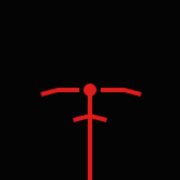
Wing Dot

Double Line Dot

Diamond Holo

Package Dot


Ultra Rare

N Dot

Full Cross


Unique

Classic Dot
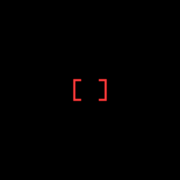
Bracket

Tri Wing

Five Dot

Eight Dot

Hashed

Hunter Cross

Star Empty

Hyperspeed

X Chevron

Lotus Dot

X Empty

Full X

Scratched Cross
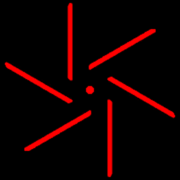
Spiral Dot
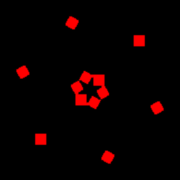
Sparked

Hi Tec

Wide Arrow Dot

Silly Dot
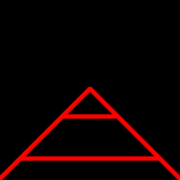
Perspective Dot


Seasonal

Bat V
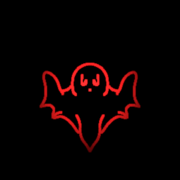
Ghost Dot

Jack O Dot

Spider Dot

Webbed Dot


Tuning
| To-do: Cut? All tuning affects weapon red dot is attached to. |
Trivia
| To-do: Mention old model replace date. Mention old default red dot texture date. |
Gallery
| To-do: Clean up. |

Old Model


History
| To-do: Clean up. Make identical to other item pages (EX: Manta). |
U5 Builds
- Build 73 - New red dot sight that actually works as it should, super useful, especially at low energy (Thank you Action Man!)
U4 Patches
See also
| Weapons and Gadgets | |
|---|---|
| Holster | Panther - Shrike |
| Primary | Manta - Hammerhead - Dragon - Falcon - Shield |
| General | Remote Charge - Banana - Grenade - CS Grenade - Smoke Grenade - Quick Smoke - Rock
Whoopee Cushion - Goober Grenade - Bloon Gun - Boxing Gloves |
| Laser Sensor - Binoculars - Bloon Cam - Medkit | |
| Red Dot - Heavy Armor - Keycard | |
| Hands - Radio - Lock Pick - Mirror Cam - Surveillance Tablet | |
| Ammo | Pistol Ammo - SMG Ammo - Shotgun Slugs - Sniper Ammo - Caseless Ammo |